
Are you locked out of your iPhone and looking for the best way to regain access without a passcode? Whether it’s due to a forgotten password, a second-hand iPhone locked to the previous owner, or repeated incorrect attempts triggering a disabled device, iPhone unlocking software can be a lifesaver. In this article, we’ll explore three of the most reliable iPhone unlocker software, focusing on real user problems and offering practical solutions.

Why You Might Need an iPhone Unlocker
Apple devices are known for their tight security measures. However, this level of protection can become a burden when:
- You’ve forgotten your screen passcode.
- You’ve entered the wrong passcode too many times, and the iPhone is disabled.
- You bought a second-hand iPhone that’s still linked to the previous owner’s Apple ID.
- Your Face ID or Touch ID has stopped working, and you can’t access your phone.
- Your iPhone is stuck in MDM (Mobile Device Management) mode or has an iCloud Activation Lock.
In any of these situations, iPhone unlocker software provides a technical workaround to bypass these locks and restore access to the device.
Top 1. MagFone iPhone Unlocker – Best Overall Solution
MagFone iPhone Unlocker is a powerful tool designed to bypass multiple types of iPhone locks, including screen passcode, Apple ID, MDM lock, and even Activation Lock under certain conditions. What makes it especially appealing is its intuitive interface and professional-grade performance, even for non-tech-savvy users. Here are the main features that MagFone iPhone Unlocker offers.
Key Features:
- Remove 4-digit/6-digit passcode, Face ID, Touch ID.
- Bypass Apple ID without the original password.
- Unlock iPhone when disabled or locked due to too many incorrect attempts.
- Remove screen time passcode and MDM lock.
- Compatible with the latest iOS and iPhone models, including iOS 18 and iPhone 16 series.
Pros:
- High success rate for unlocking without data loss (depending on the mode).
- Easy-to-use interface.
- Fast unlocking process.
- Clear instructions and minimal technical knowledge required.
Why Choose MagFone iPhone Unlocker?
Compared to other tools on the market, MagFone iPhone Unlocker strikes the perfect balance between usability and capability. Many users are intimidated by overly technical unlocking tools, but MagFone simplifies the process into just a few clicks. It also covers more use cases than typical software—ideal for anyone dealing with a locked or second-hand iPhone.
How to Unlock iPhone with MagFone iPhone Unlocker
If you’re ready to unlock your iPhone using MagFone, here’s a step-by-step guide.
Step 1: Download MagFone iPhone Unlocker from the official website and install it on your Windows or Mac computer. Open the program and select the appropriate mode depending on your lock situation (e.g., “Unlock Screen Passcode” or “Remove Apple ID”).

Step 2: Plug your iPhone into the computer with the help of a USB cable. MagFone will automatically detect the device. Click “Start” to proceed.
Step 3: Follow the on-screen instructions to place your iPhone into Recovery Mode or DFU Mode. The software will detect your device model and iOS version, then prompt you to download the corresponding firmware package. Confirm and begin the download.
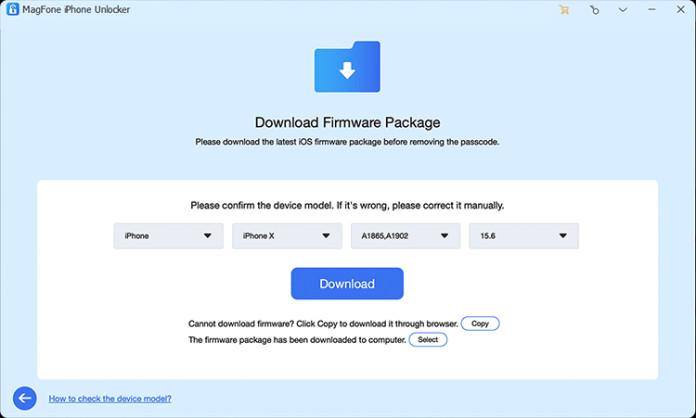
Step 4: Once the firmware is downloaded, click “Start to Unlock.” The unlocking process will begin. Within minutes, your iPhone will be free from the lock and ready to use.
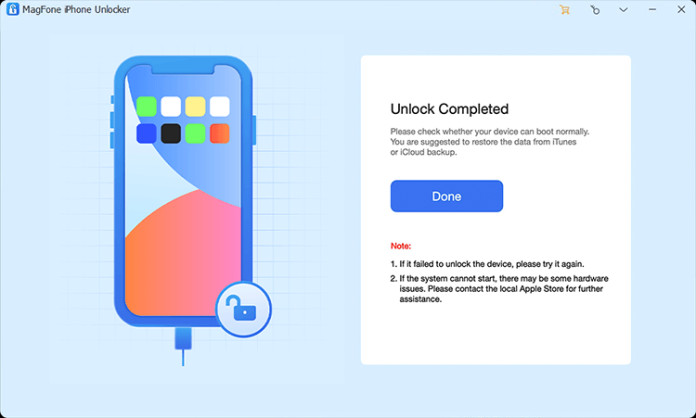
Note: Some modes may result in data loss (especially screen passcode removal), so ensure you back up your data if possible.
Top 2. Tenorshare 4uKey
Tenorshare 4uKey is another popular iPhone unlocker software that supports unlocking screen locks and removing Apple ID. It has a good reputation for reliability and speed, although it may lack some of the advanced compatibility of MagFone.
Key Features:
- Remove screen passcode, Face ID, and Touch ID.
- Remove Apple ID on activated devices.
- Remove MDM from iPhone
- Supports bypassing screen time passcodes.
Limitations:
- Apple ID removal requires the device to be activated and Find My iPhone turned off.
- Data loss is likely during unlocking.
Top 3. iMyFone LockWiper
With iMyFone LockWiper, users can remove various types of locks, such as screen passcodes, Apple ID, MDM profiles, and screen time limits. It’s user-friendly and supports most iOS versions.
Key Features:
- Remove passcodes, Apple ID, and MDM profiles.
- Unlock disabled iPhones.
Limitations:
- Some advanced features require additional configuration.
- Apple ID removal may not work if Find My iPhone is enabled.
Final Thoughts: Which iPhone Unlocker Should You Use?
While all three tools—MagFone iPhone Unlocker, Tenorshare 4uKey, and iMyFone LockWiper—are competent at removing various iPhone locks, MagFone iPhone Unlocker is the most comprehensive and user-friendly option. It handles a wide range of scenarios with clear guidance and minimal tech know-how required. Whether you’ve forgotten your passcode or are dealing with a locked second-hand device, MagFone delivers fast and reliable results.
Why MagFone stands out? MagFone supports more lock types than most alternatives, it is clear, step-by-step instructions make it beginner-friendly, meanwhile, it’s regular updates ensure compatibility with the latest iOS and iPhone models. Unlocking an iPhone doesn’t have to be a complicated or frustrating experience. With the right tool—like MagFone iPhone Unlocker—you can regain control of your device in minutes.