

Spoofing in Pokémon GO is not just cheating, it is strategy. While the game promotes fairness, top players bend GPS reality to gain an edge. With tools like iToolab AnyGo you can explore global hotspots, catch rare Pokémon, and join raids anywhere without risking bans. It is not about fitness anymore, it is about freedom, precision, and playing smart in 2025.
Understanding Niantic’s Anti-Cheating Measures
Niantic—the developer behind Pokémon GO—has built a layered and evolving anti-cheat system aimed at preserving fairness. Their detection isn’t just code-based; it’s behavioral, contextual, and surprisingly adaptive. Let’s break it down:
How Niantic Detects Cheating
1. Unnatural Movement Patterns
Niantic constantly monitors GPS signals for realistic movement. If a player’s location jumps from San Francisco to Paris in 30 seconds, it’s flagged. Similarly, if someone appears to walk at 300 km/h, the system detects it as spoofing. These irregularities are cross-referenced with in-game actions for validation.
2. Unauthorized Third-Party Tools
The app scans for modified or injected software that alters its normal behavior. Tools like radar maps, auto-catch bots, and joystick overlays can all trigger detection. If unauthorized apps interact with Pokémon GO, account restrictions may follow.
3. Player Reports
Niantic also relies on its community to identify cheaters. If players report suspicious behavior—like someone controlling a gym remotely—the system investigates. Repeat offenses from the same account often result in automated or manual disciplinary action.
What Happens If You’re Caught? (Niantic’s 3-Strike Policy)
First Strike: Warning
An in-game message is issued, and some features like rare spawns or raid access may be temporarily disabled.
Second Strike: Suspension (up to 30 days)
The account is locked for a full month. During this time, no access to the game is allowed.
Third Strike: Permanent Ban
The account is permanently terminated. All progress, inventory, and purchases are lost with no recovery.
Niantic regularly updates its detection systems to adapt to new spoofing methods in Pokémon GO. Spoofing Pokémon GO without caution or by using outdated tools is the quickest way to lose your account. In this ongoing cat-and-mouse game, only a sophisticated and frequently updated tool like iToolab AnyGo can offer reliable protection and ensure a safer spoofing experience.
Step-by-Step Guide to Cheat in Pokemon GO by Using iToolab AnyGo
iToolab AnyGo is a comprehensive GPS spoofing tool designed for both iOS and Android users, enabling seamless location changes without the need for jailbreaking or rooting devices. With its user-friendly interface and robust features, AnyGo offers a reliable solution for location-based gaming and applications. Here is the downloading process:
For iOS Users:
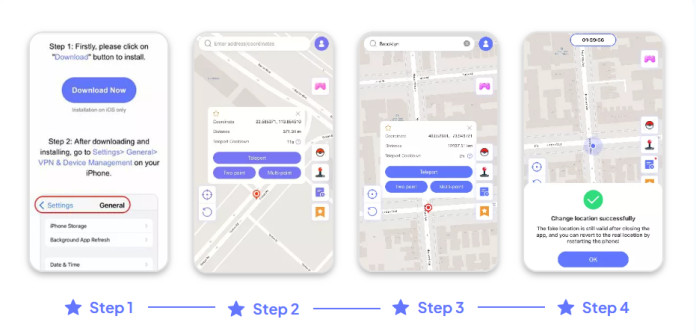
Step 1: Set Up the iOS App via Wi-Fi
Start by installing the iToolab AnyGo – iOS Location Changer on your iPhone. Instead of using a USB cable, connect your device wirelessly via Wi-Fi to your computer. The app supports stable wireless spoofing without the need for jailbreaking.
Step 2: Choose Your Destination Coordinates
Launch AnyGo and navigate to the map interface. Use the search bar to type in either the exact address or GPS coordinates of the place you want to appear in virtually.
Step 3: Lock in the Target Location
Once the map centers on your chosen destination, a pin will be dropped on the spot. Confirm the location by clicking the “Go” button. This instructs the system to prepare the virtual jump.
Step 4: Simulate the Teleportation
Your iPhone’s GPS will now be updated in real-time. Any location-based app you open—like Pokémon GO—will read your position as if you’re already at the selected destination.
For Android Users:
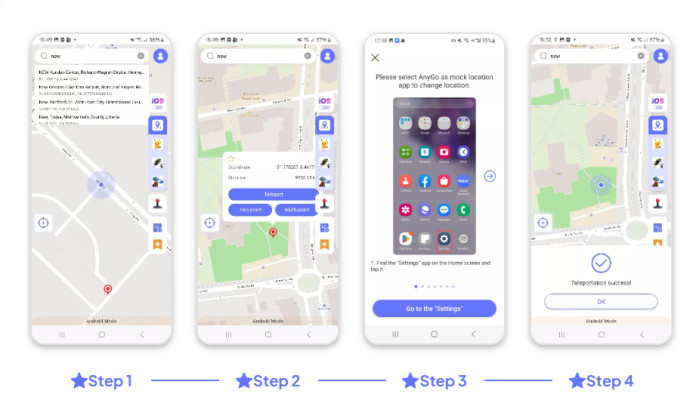
Step 1: Install the app and enter destination
Install iToolab AnyGo for Android app on your device and type in the destination or coordinates you want to appear in. No need for anything fancy — just pick where you want to be.
Step 2: Lock in location
Once the map loads and shows the selected city or area, tap the “Teleport” button to lock in that location.
Step 3: Location updated
You’re all set. Your phone’s location is now changed to the place you selected, and any location-based app will reflect that instantly.
Mastering Cooldowns: The Real Secret to Safe Spoofing
Spoofers fear it. Casuals misunderstand it. But real players? They manage it. Cooldown is what keeps your spoofing safe — and FonesGo’s smart handling of it makes all the difference.
What Is Cooldown in Pokémon GO
- Cooldown is the delay required after a GPS location change to avoid detection.
- If you teleport and spin a PokéStop too quickly, Niantic flags it as impossible travel.
- The more distance you cover, the longer you’ll need to wait.
Example:
- Move < 1 km: 30 seconds cooldown
- Move 10–25 km: ~10 mins
- Move 1000+ km: 2-hour cooldown
Why Joystick Mode Shrinks Cooldown Risk
- Unlike instant teleporting, joystick walking simulates real-time movement.
- Since you’re not “jumping,” Pokémon GO treats it like a genuine walk.
- FonesGo’s joystick introduces pauses, drift, and variable speed — mimicking fatigue and footpath behavior.
FAQs
1. Can iToolab AnyGo be trusted for safe spoofing in Pokémon GO?
Yes, AnyGo is considered one of the safest spoofing tools because it doesn’t require rooting or jailbreaking. It mimics realistic player movement and includes features like cooldown timers to reduce detection risk. Still, responsible use is crucial—rapid teleporting or ignoring cooldowns may lead to soft bans.
2. Can AnyGo solve Error 12 on iOS?
Yes. iToolab AnyGo, especially when used alongside iWhereGo Genius, can successfully fix the “Failed to Detect Location (Error 12)” issue on iOS. This combination stabilizes GPS signals and works around iOS’s strict location checks. Also, when you’re connected via iOS Bluetooth mode, this error doesn’t appear at all, making spoofing much smoother and more stable.
3. Can I use AnyGo for free?
Yes, but with limitations. AnyGo offers a free trial that lets you explore basic features like viewing the map and testing location movement. However, advanced functions like joystick mode, GPX import, and multi-spot routes require a paid license. It’s great for testing, but full spoofing control comes with the upgrade.
Conclusion
In Pokémon GO, your location shapes your gameplay. iToolab AnyGo lets you explore the world without leaving home. Hunt regional Pokémon, join remote raids, and discover new PokéStops without rooting or jailbreaking your device. Simply choose a location, and your phone will act as if you’re there. AnyGo manages cooldown times, supports GPX route imports, fixes issues like Error 12, and even enables virtual walking via Bluetooth. It’s a trusted tool among serious players who want safe and flexible spoofing options.
