
Introduction: Why Gbyte Recovery Stands Out in 2025
In today’s digital age, data loss on smartphones, especially on iPhones, is one of the most stressful experiences. Whether it’s photos from a memorable vacation, important messages, or irreplaceable chat histories, losing such files can feel devastating. Fortunately, with the right tools, recovering lost iPhone data is no longer a pipe dream.
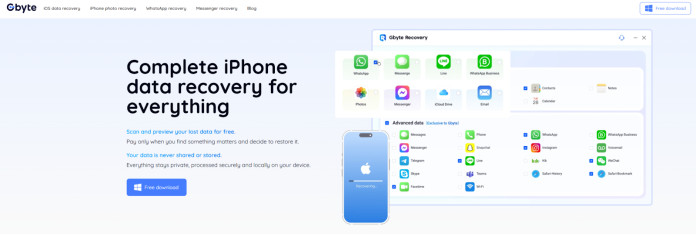
When it comes to iPhone data recovery, Gbyte Recovery has quickly become a go-to solution for users looking to restore their lost files in 2025. Unlike traditional recovery methods, which often rely on iCloud or iTunes backups, Gbyte Recovery works directly on your device, scanning your iPhone’s internal storage for deleted data. This means you can recover lost files even when you don’t have a recent backup or if your backup is incomplete.
But what truly makes Gbyte Recovery stand out? Let’s explore its features, performance, ease of use, and pricing in this detailed review.
Gbyte Recovery: A Trusted Third-Party Data Recovery Tool
Gbyte Recovery is a third-party data recovery software designed specifically for iPhone users. Unlike older recovery tools that require backups from iTunes or iCloud, Gbyte Recovery leverages an innovative on-device scanning technology to locate and restore lost data directly from your iPhone’s storage.
Why Gbyte Recovery is the Best Choice in 2025
- No Backup Required
The most notable feature of Gbyte Recovery is that it doesn’t rely on iTunes or iCloud backups to restore deleted files. This is particularly beneficial for users who haven’t set up recent backups or whose backups are outdated. Whether you accidentally deleted text messages, photos, or app-specific files, Gbyte Recovery can still scan your iPhone’s internal storage and retrieve the data directly. - Privacy-Focused Design
In a world where privacy concerns are paramount, Gbyte Recovery offers a solution that ensures your data stays private. All scanning and recovery operations happen locally on your iPhone. This means your files never leave your device, and there’s no risk of sensitive data being uploaded to the cloud or third-party servers. - Supports Third-Party App Data
One of the standout features of Gbyte Recovery is its ability to recover data from third-party apps like WhatsApp, LINE, Instagram, and Messenger. For many iPhone users, this feature is a game-changer, as traditional recovery methods often overlook app-specific data. - Selective Data Recovery
With Gbyte Recovery, you don’t have to restore your entire device. It allows selective recovery, meaning you can recover only the files you need (such as specific messages, photos, or app files), without affecting your current data.
How Gbyte Recovery Works
Using Gbyte Recovery is straightforward, and the entire recovery process can be completed in a few simple steps. Here’s how it works:
- Download and Install Gbyte Recovery
First, you’ll need to download and install the Gbyte Recovery app from the official website. The app is available for iOS devices and works with all iPhone models, including the latest iPhone 15 and iPhone 16 running iOS 16, 17, and 18. - Choose Data Types to Recover
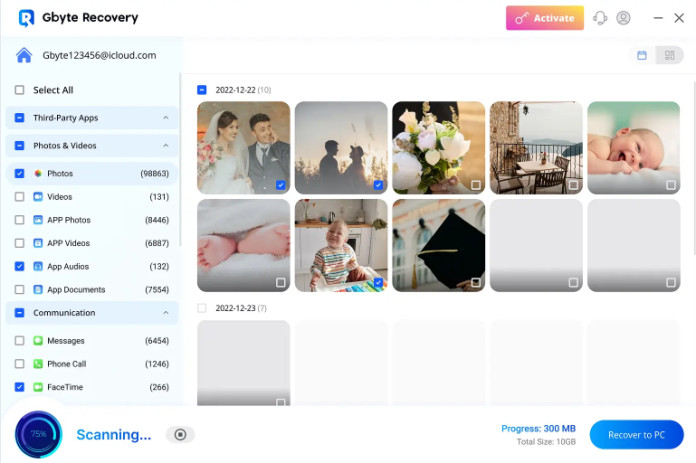
After installing the app, open it and select the types of data you want to recover, including photos, text messages, WhatsApp chats, app-specific data, or other files. - Run Smart or Deep Scan
You can choose between a Quick Scan for recently deleted files or a Deep Scan for older or harder-to-find data. The Deep Scan feature is more thorough and can recover files that other tools may overlook. - Preview and Recover
Once the scan is complete, you’ll be presented with a preview of the recoverable files. You can browse through thumbnails of photos or preview text messages before deciding which files to restore. After selecting the data you want, simply tap “Recover,” and the files will be restored to your device. - Privacy and Local Storage
The best part of the process is that everything happens locally on your iPhone. There’s no need to worry about uploading your personal data to the cloud, ensuring that your recovery process is completely private and secure.
Key Features of Gbyte Recovery
-
No Backup Needed
Gbyte Recovery is perfect for users who haven’t set up recent backups. It doesn’t require iCloud or iTunes, making it the go-to tool for those who want to restore lost files without the risk of overwriting their current data.
-
On-Device Scanning
Gbyte Recovery uses a powerful on-device scanning algorithm that searches through your iPhone’s storage for deleted data, including photos, messages, videos, and app data.
-
Fast and Efficient
With Gbyte Recovery, you can restore lost data in minutes. The Quick Scan option is especially useful for recovering recent deletions, while the Deep Scan function ensures thorough scanning for older data.
-
Privacy-Focused
All recovery processes are handled locally, ensuring that your files stay secure on your device and are never uploaded to any server. This is a huge advantage over traditional recovery tools that may upload data to cloud servers.
-
User-Friendly Interface
Gbyte Recovery is designed to be user-friendly, making it easy for anyone to recover their lost data. No technical skills are required, and the app’s interface is simple and intuitive.
Pricing and Plans
Gbyte Recovery offers competitive pricing with two flexible options:
- Monthly Plan: $49.99/month
- Annual Plan:$8.33/month(billed US$99.99 yearly)
- Lifetime License: $149.99 (one-time payment)
The lifetime license option is an excellent value for users who anticipate needing data recovery in the future. The subscription-based pricing allows you to pay as you go, which can be ideal for short-term use.
Pros and Cons of Gbyte Recovery
Pros:
- Works without a backup: Ideal for users with outdated or non-existent backups.
- No need for a computer: Fully app-based, making it convenient for users who prefer mobile solutions.
- Local, private recovery: Your data stays on your device throughout the entire process.
- Supports third-party apps: Recovers data from popular apps like WhatsApp and Instagram.
- Simple and intuitive interface: Easy to use, even for non-technical users.
Cons:
- Requires installation on a computer for initial setup.
- Deep Scan can take a bit longer on devices with large amounts of data.
Why Gbyte Recovery is the Top Choice in 2025
In 2025, there are several iPhone data recovery tools available, but Gbyte Recovery stands out for its ability to recover data directly from your iPhone without relying on backups. Whether you’ve accidentally deleted photos, text messages, or app-specific data, Gbyte Recovery offers the most effective and privacy-focused solution.
Unlike older tools that can be complicated and require full device restores, Gbyte Recovery provides selective recovery, allowing users to restore only what they need. Its local scanning ensures privacy, while its quick recovery time makes it a top choice for anyone who wants to restore their iPhone data quickly and securely.
If you need to restore deleted text messages or recover lost media, Gbyte Recovery should be your go-to tool.
Conclusion
If you’ve lost important data on your iPhone and you don’t have a recent backup, Gbyte Recovery is the best solution for 2025. With its advanced on-device scanning, privacy-first design, and ability to recover data from third-party apps, Gbyte Recovery stands out as the most reliable, user-friendly, and secure data recovery tool available.
No matter your situation, Gbyte Recovery offers the fastest, safest, and most efficient way to get your data back, all while ensuring your privacy is maintained. Whether you need to recover lost photos, deleted messages, or app data, Gbyte Recovery is your trusted third-party iPhone data recovery solution.
