
As a popular dating app, Tinder is great for connecting people from different places together. It allows you to meet new people and form new friendships. However, the location lock can be frustrating. Whether you’re planning a trip, moving soon, or just curious about dating prospects in another city, being stuck swiping only near your current GPS location limits the experience. Now, the good news is that you don’t need to be physically somewhere to swipe there. In this post, we will show you how to change location on Tinder with or without Tinder Plus. Let’s dive in.
Why Would You Want to Change Tinder Location?
There are lots of reasons you might want to swipe in a different city:
● You’re moving to a new area and want to start meeting people in advance
● You’re going on vacation and want to set up dates or find travel buddies
● You’re curious about dating scenes in other regions or countries
● You’re simply looking to broaden your options beyond your immediate surroundings
By default, Tinder uses your phone’s GPS to determine where you are. If you don’t subscribe to a premium plan, you can only see and swipe on people in your physical area. But there are ways to get around that.
Method 1: Use Tinder Passport (Tinder Plus or Gold)
Tinder Passport is the official feature that lets you manually change your location. It’s available to Tinder Plus, Gold, and Platinum subscribers.
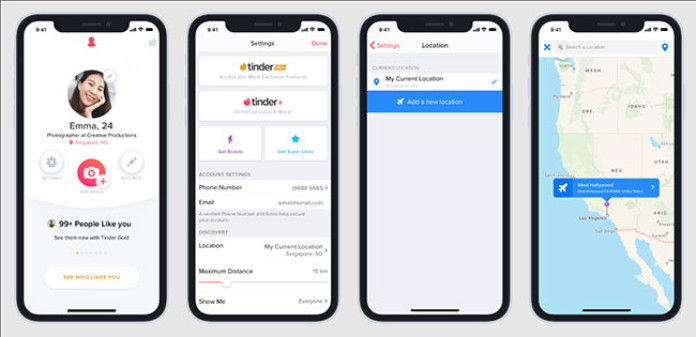
Step 1: Open Tinder on your mobile device.
Step 2: Tap your Profile icon, then go to Settings.
Step 3: Scroll to Location on iOS device or Sliding In on Android device.
Step 4: Tap on “Add a new location” and type to search for the city you want.
Step 5: Confirm the new location and start swiping in that area to explore matches.
Pros:
● Safe and officially supported
● Works instantly
● Easy to use
Cons:
● Requires a paid Tinder subscription
● You can only change one location at a time
● Doesn’t let you simulate movement
Method 2: Use TunesKit Location Changer (No Tinder Plus Needed)
TunesKit Location Changer is a powerful desktop tool that lets you spoof your GPS location on both iPhone and Android without needing to root or jailbreak your device. Thus, you can swipe in any city in the world without paying for Tinder, and even simulate real movement to avoid being banned.
Aside from Tinder, TunesKit Location Changer can change location for different dating apps, such as Grindr, Bumble, OkCupid, etc. To hide your real location for privacy protection, you can even send fake location on WhatsApp, Instagram, Life360, and more social apps.
Main Features of TunesKit Location Changer:
● Instantly teleport to any location worldwide
● Simulate realistic movement with routes or a joystick
● Works with any location-based apps related to gaming, dating, social
● Compatible with iOS 7~iOS 18 and Android 6.0 and up
● 100% safe and private, no jailbreak, no root needed
Step 1: Connect Mobile Device to Your Computer
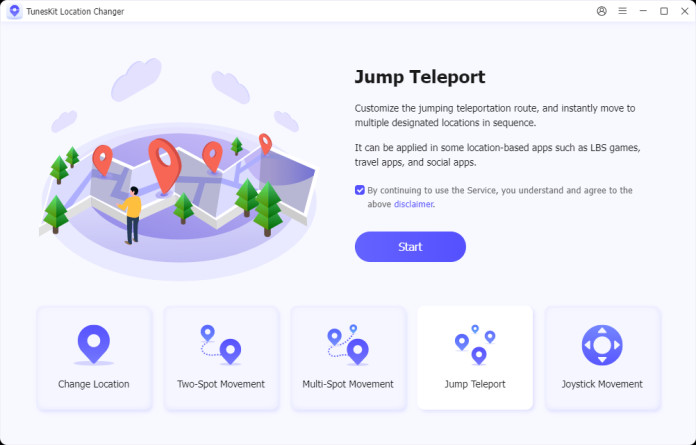
Go to the official website and download TunesKit Location Changer. Then hook up your mobile phone, either an iPhone or Android, to your computer. Simply select “Change Location” in the main interface and click the “Start” button to proceed.
Step 2: Change Location on Tinder
TunesKit Location Changer provides you with four core location spoofing modes:
Teleport Mode: instantly move to any location
Two-Spot Mode: simulate movement between two points
Multi-Spot Mode: move through a custom route
Joystick Mode: manually move in real time with direction control
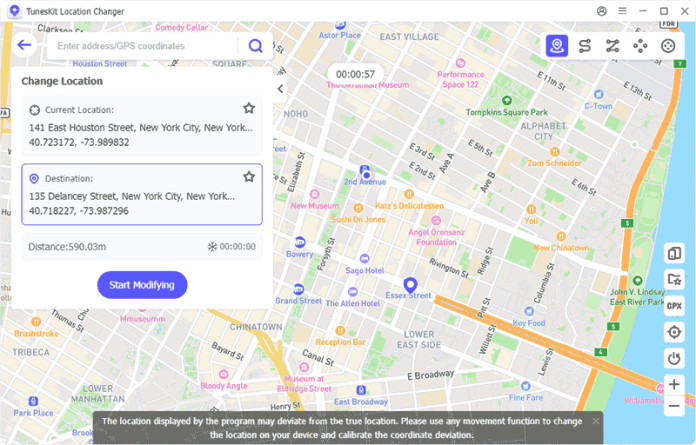
You can use Teleport Mode, enter a specific address/GPS coordinate you want to teleport to in the search box. Once confirmed, click Start Modifying to successfully change the location. Afterward, you can open Tinder and start swiping in the new area without Tinder Plus.
Bonus Tip: Simulate Movement to Stay Safe
Tinder’s algorithm can detect weird behavior, like hopping between New York and Tokyo in five minutes. With a professional location changer, you can simulate movement at walking or driving speeds using different modes. This mimics real activity, reduces detection risk, and helps avoid being shadowbanned. So, no matter you spoof location on iPhone or Android, ensure not to fake GPS frequently, or teleport to a new location with abnormal speed.
Tinder Location Change FAQ
Q1: Is it safe to change location on Tinder?
Q2: Do VPNs work for changing Tinder location?
A: Not really. Tinder relies on GPS, not IP address. VPNs alone don’t fool Tinder unless paired with a GPS spoofer.
Q3: Does Tinder use GPS or Wi-Fi/IP to track location?
A: Primarily GPS. That’s why spoofing GPS directly is the only reliable method to change your location.
Final Thoughts
Changing your Tinder location opens up a whole new world of dating possibilities. While Tinder Passport is the official method, it comes with a monthly fee and limited flexibility. If you want full control without paying for Tinder Plus, then TunesKit Location Changer is a smart, reliable, and safe solution. It works on both iOS and Android, supports realistic movement simulation, and doesn’t require jailbreaking your device. Now you can match with people in any city around the globe and experience Tinder the way you want. Smart swiping starts with smart location control.
