
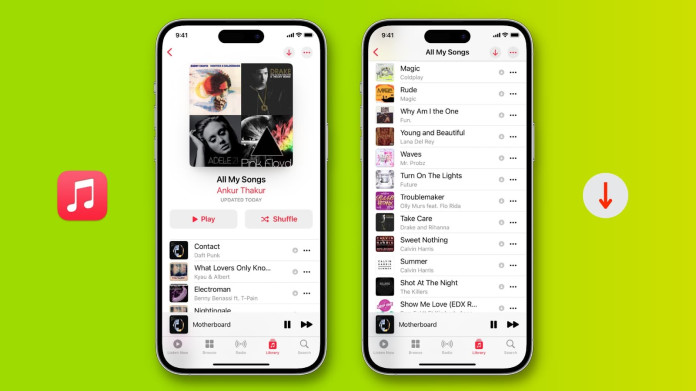
In today’s digital age, music streaming platforms like Apple Music have revolutionized how we access and enjoy music. However, while Apple Music offers the convenience of streaming, many users desire the ability to download songs for offline listening. Understanding how to download music from Apple Music, the limitations involved, and exploring alternatives like MusicFab can enhance your music experience.
Downloading songs from Apple Music allows you to enjoy your favorite tracks without an internet connection. Here’s how you can do it:
1. Ensure You Have an Active Apple Music Subscription
To download music, you must have an active Apple Music subscription. Without it, the download option won’t be available.
2. Add Songs to Your Library
Browse through the Apple Music catalog and add songs, albums, or playlists to your library. This step is essential before downloading.
3. Download for Offline Listening
Once added to your library, you can download the content:
- On iPhone or iPad: Open the Apple Music app, navigate to the desired content, and tap the download button (cloud icon with a downward arrow).
- On Mac or PC: Open the Apple Music app or iTunes, find the content, and click the download button.
Downloaded content is available for offline listening as long as your subscription remains active.
Limitations of Apple Music Downloads
While downloading songs from Apple Music is convenient, there are several limitations to be aware of:
1. Digital Rights Management (DRM) Protection
Downloaded songs from Apple Music are protected by DRM, meaning they can only be played within the Apple Music ecosystem. If you cancel your subscription, you lose access to these downloads.
2. Device and Format Restrictions
DRM protection limits playback to authorized devices and specific formats, restricting your ability to transfer or play the music on other platforms.
3. Subscription Dependency
Your access to downloaded music is tied to your Apple Music subscription. If you unsubscribe, your downloaded content becomes inaccessible.
Why Consider MusicFab?
To overcome the limitations of Apple Music downloads, MusicFab Apple Music Converter offers a solution that provides greater flexibility and control over your music collection.
MusicFab Apple Music Converter is a powerful tool designed to help you download and convert Apple Music tracks to various formats such as MP3, FLAC, M4A, and WAV. This allows you to enjoy your favorite songs offline without the limitations imposed by Apple’s DRM protection.
1. DRM Removal
MusicFab removes DRM protection from Apple Music downloads, allowing you to convert Apple Music songs to MP3, FLAC, WAV, and more.
2. High-Speed Downloads
The software offers high-speed downloads, enabling you to save your favorite tracks quickly and efficiently.
3. Offline Access
Once converted, the songs are DRM-free, giving you the freedom to play them on any device without the need for an active internet connection.
4. Broad Compatibility
MusicFab supports multiple platforms, including Windows and macOS, ensuring compatibility with various devices and operating systems.
How to Use MusicFab Apple Music Converter
MusicFab Apple Music Converter provides a user-friendly interface and powerful features to enhance your music experience.
🔹 Step 1: Download and Install MusicFab
- Visit the official MusicFab website
- Click on the “Download” button to get the installer for your operating system (Windows or Mac).
- Once downloaded, run the installer and follow the on-screen instructions to complete the installation process
🔹 Step 2: Launch the Application
- Open the MusicFab application on your computer.
🔹 Step 3: Log into Your Apple Music Account
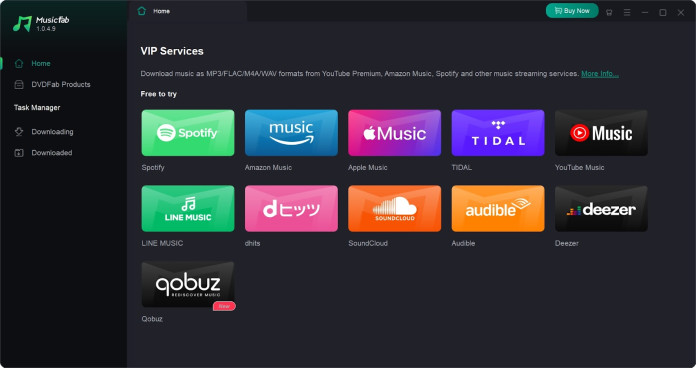
- In the main interface, click on the “VIP Service” tab.
- Select the “Apple Music” option.
- Log in using your Apple ID credentials to authorize the application to access your Apple Music library
🔹 Step 4: Select the Content You Want to Download
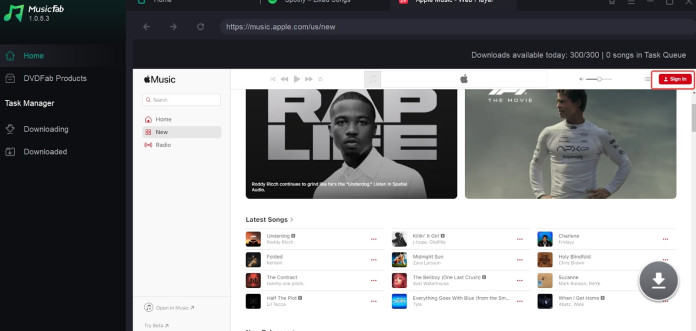
- Use the built-in browser within MusicFab to navigate to the Apple Music content you wish to download.
- Browse through your playlists, albums, or search for specific songs.
- Once you’ve found the content, click on it to add it to your download queue.
🔹 Step 5: Choose Output Settings
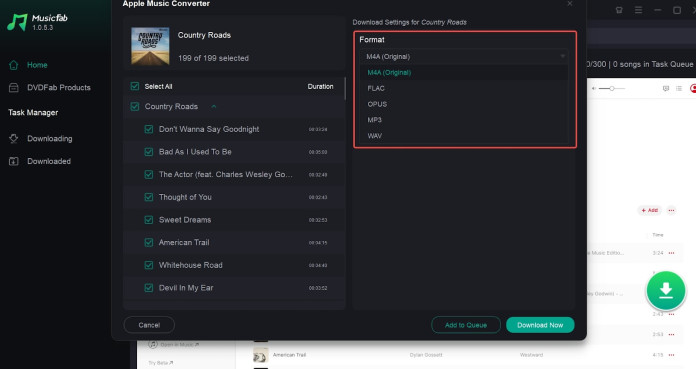
- After adding content to the queue, a settings panel will appear.
- Here, you can select the output format (MP3, FLAC, M4A, WAV) and adjust quality settings such as bitrate and sample rate.
- You can also choose to retain ID3 tags and lyrics if desired.
🔹 Step 6: Start the Download Process
- Once you’ve configured your settings, click on the “Download Now” button to begin the conversion and download process.
- MusicFab will download and convert the selected Apple Music content to your chosen format.
🔹 Step 7: Access Your Downloaded Files
- After the download is complete, navigate to the output folder specified in the settings.
- You can now enjoy your DRM-free Apple Music tracks offline on any compatible device.
Conclusion
While Apple Music provides the convenience of streaming and downloading, its DRM protection and subscription dependency can limit your music experience. MusicFab offers a solution by removing these restrictions, allowing you to enjoy your music collection with greater freedom and flexibility. Whether you’re looking to back up your library, transfer songs to different devices, or simply enjoy your music offline without limitations, MusicFab can enhance your music experience.
Remember, understanding the tools and options available can help you make the most of your music collection. By considering alternatives like MusicFab, you can enjoy your favorite tracks without the constraints imposed by streaming platforms.
